
Artificial intelligence is no longer confined to academic research labs or science fiction stories. Today, it lives right inside your web browser and smartphone. At the forefront of this shift is Chat GPT, a conversational chatbot developed by OpenAI that has transformed how millions of people write, code, learn, brainstorm, and solve complex problems every single day.
Whether you have never typed a single prompt into an AI tool or you are looking to refine your daily workflow, this comprehensive guide covers everything you need to know about Chat GPT. You will discover what makes it tick, how to access it on desktop and mobile, its core multimodal capabilities, step-by-step instructions for getting started, and practical tips to get the most accurate answers possible.
What Is Chat GPT?
Developed by San Francisco-based AI research laboratory OpenAI, Chat GPT is an artificial intelligence-driven conversational agent. At its core, it is designed to understand natural human language and produce detailed, context-aware, human-like written responses in real time.
The name itself provides a clear breakdown of its underlying technology:
- Chat: The interface is built as a back-and-forth dialogue. You send a query or an instruction (commonly referred to as a “prompt”), and the AI responds dynamically, remembering previous turns in the conversation.
- G (Generative): The system does not merely pull pre-written sentences from a database or search index. Instead, it generates novel text word-by-word based on statistical patterns learned during training.
- P (Pre-trained): Before interacting with users, the underlying engine analyzed massive datasets containing billions of text parameters, public web pages, books, code repositories, and educational literature.
- T (Transformer): The system relies on the transformer neural network architecture—a breakthrough deep learning model introduced in 2017 that excels at processing sequences of words and understanding contextual relationships across long passages.
Unlike traditional search engines that simply match keywords to index pages, Chat GPT synthesizes information, adjusts its tone based on your preferences, follows multi-step directions, and reasons through complex questions.

How Chat GPT Works Under the Hood
To use Chat GPT effectively, it helps to understand the foundational principles driving its responses. You do not need a computer science degree to grasp the essential mechanics:
Large Language Models (LLMs)
Chat GPT is powered by OpenAI’s family of Generative Pre-trained Transformer models (such as GPT-4o, GPT-4, and lightweight iterations). These models operate via probabilistic text generation. When you submit a question, the model breaks your text down into smaller semantic units called “tokens” (chunks of characters or words). It evaluates the context of your entire conversation and calculates the most logically and contextually probable token to output next.
Training in Two Core Phases
- Unsupervised Pre-training: The base model absorbs language grammar, world facts, logical structure, and diverse communication nuances across trillions of tokens of text.
- Reinforcement Learning from Human Feedback (RLHF): Raw models can produce erratic or unhelpful outputs. To make the model safe, polite, and helpful, human trainers review and rank model responses. Optimization algorithms then fine-tune the system toward helpfulness, factual accuracy, and safety constraints.
Context Windows & Conversation Memory
During a single session, Chat GPT tracks previous questions and answers within what is known as a context window. This allows you to ask clarifying follow-ups—such as “Can you make that shorter?” or “Explain step 3 in simpler terms”—without repeating the original instructions.
Key Capabilities: What Can Chat GPT Actually Do?
Chat GPT is an adaptable digital assistant that spans dozens of industries and skill levels. Its key capabilities include:
Content Creation and Written Communication
- Drafting and Editing: Create emails, blog post outlines, social media updates, and professional cover letters.
- Revising Tone: Transform casual drafts into executive briefs, or translate academic jargon into layman’s terms.
- Summarization: Condense lengthy research papers, meeting notes, transcripts, or articles into punchy executive summaries.
Software Engineering and Data Tasks
- Writing Code: Generate scripts in Python, JavaScript, HTML/CSS, SQL, C++, and Go.
- Debugging & Syntax Errors: Paste error tracebacks directly into the chat to discover why a script crashed and receive fixed syntax.
- Data Analysis: Upload CSV files or spreadsheets to parse trends, generate visualizations, calculate averages, and clean messy records.
Multimodal Reasoning (Vision and Images)
Modern versions of Chat GPT support multimodal inputs:
- Image Comprehension: Upload a photograph of a broken appliance, a screenshot of a software bug, or a handwritten math formula to get diagnostic help and line-by-line solutions.
- Image Generation: Through built-in image models (like DALL·E), you can describe any visual scene in plain words and receive high-resolution, custom digital artwork in seconds.
Real-Time Voice Conversations
On mobile and desktop apps, Advanced Voice Mode enables low-latency, natural spoken conversations. You can practice foreign language pronunciation, rehearse job interviews, or have hands-free brainstorming discussions while walking.
How to Access and Set Up Chat GPT
OpenAI makes Chat GPT accessible across multiple platforms and screen sizes. You can set it up in just a few minutes.
Web Browser Access
- Open your browser and navigate to the official portal at chatgpt.com.
- Click Sign Up to create an account using your email address, Google account, Apple ID, or Microsoft credentials.
- Confirm your details. Once verified, you will land directly on the conversational dashboard.
Mobile Applications (Android & iOS)
For on-the-go productivity, install the official mobile client:
- Android Users: Download the verified app directly from the Google Play Store.
- iOS Users: Download the app from the Apple App Store.
- Tip: Always verify that the developer is listed as OpenAI to ensure you are downloading the genuine application and protecting your account security.
Integration in Everyday Workflows
Much like learning how to sync modern messaging tools on your desktop—such as using WhatsApp Web to manage personal and business chats simultaneously—keeping Chat GPT pinned in an open browser tab or on your mobile home screen streamlines daily problem-solving.
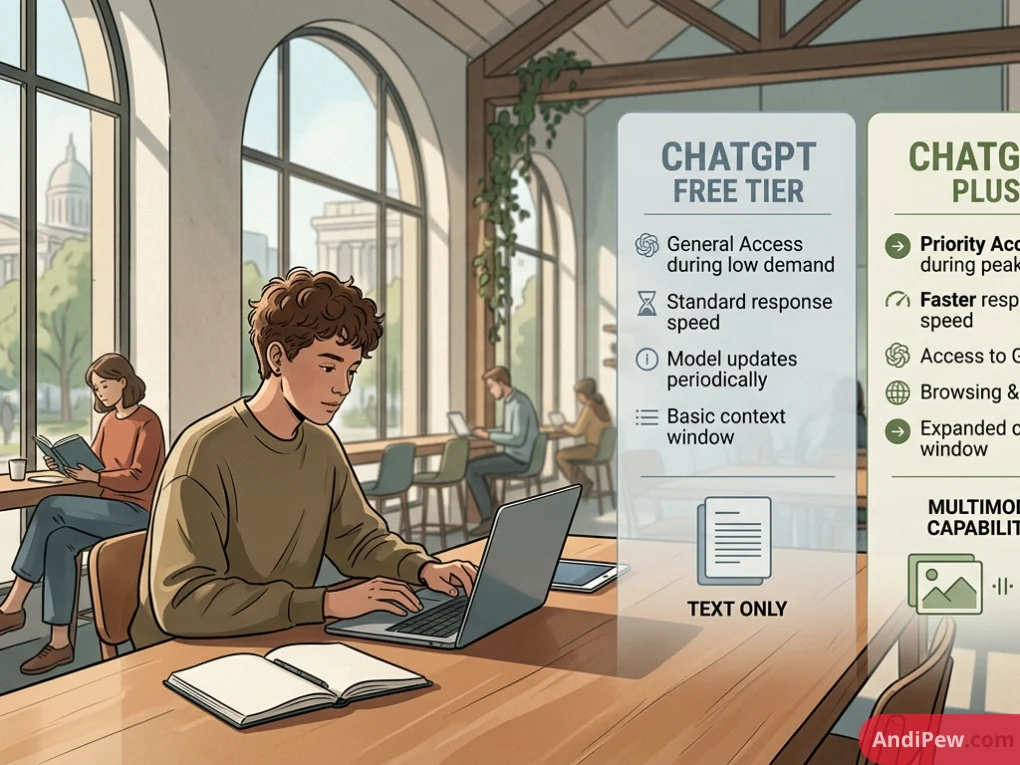
Free vs. Paid Subscriptions: Which Should You Choose?
OpenAI provides free access alongside premium individual and organizational subscriptions. Here is how the tiers compare:
| Feature / Metric | Chat GPT Free Tier | Chat GPT Plus ($20/month) | Chat GPT Team / Enterprise |
| Model Access | Standard access to flagship models (subject to dynamic rate limits) | Priority access to top models (GPT-4o, reasoning models) | Maximum usage caps, dedicated admin management |
| Response Speed | Standard response velocity | High-speed processing, even during peak traffic | High-speed infrastructure with priority bandwidth |
| Advanced Features | Basic web browsing, file analysis, and limited image generation | Expanded file uploads, extensive image generation, Advanced Voice Mode | Full administrative analytics, custom workspace sharing |
| Custom GPTs | Explore and utilize public Custom GPTs | Build, configure, and share proprietary Custom GPTs | Share private workspace GPTs internally |
| Data Privacy Controls | User can opt out of model training in account settings | User can opt out of model training in account settings | Workspace data excluded from model training by default |
Is the Free Plan Sufficient?
For occasional questions, general writing support, recipe ideas, and quick coding suggestions, the Free version is more than enough for most everyday users.
If you are a professional researcher, software engineer, or content creator who requires heavy file processing, custom GPT creation, and uninterrupted access during peak working hours, Chat GPT Plus offers exceptional return on investment.
The Art of Prompt Engineering: How to Get Better Answers
The quality of Chat GPT’s output depends directly on the clarity of your instructions. Generic questions yield generic answers. Specific, structured prompts generate expert-level results.
The C-T-C-O Framework
To write high-impact prompts, incorporate four fundamental elements:
Context: Explain who you are and what the scenario entails.
- Example: “I am managing an e-commerce website redesign for a boutique coffee brand.”
Task: Clearly define what the AI must write or analyze.
- Example: “Draft a formal project update email to stakeholders explaining a one-week delay.”
Constraints: Outline strict guardrails regarding length, vocabulary, and what to avoid.
- Example: “Keep the email under 150 words. Maintain an apologetic yet solution-focused tone. Do not use technical jargon.”
Output Format: Specify how the final response should be structured.
- Example: “Format the response with an executive summary sentence, followed by three clear bullet points detailing the mitigation schedule.”
Practical Before-and-After Prompt Examples
Example 1: Writing & Communication
- Weak Prompt: “Write about time management.”
- Strong Prompt: “Act as an executive productivity coach. Provide 4 actionable time-management strategies tailored for remote software engineers facing frequent Zoom fatigue. Format the answer as a bulleted checklist with a 2-sentence rationale for each tip.”
Example 2: Coding & Web Development
- Weak Prompt: “Fix this Python function.”
- Strong Prompt: “Review this Python function for memory leaks and runtime complexity. Explain why the existing implementation is suboptimal for arrays with over 100,000 items, and provide a refactored version using list comprehension.”
Limitations and Safe AI Practices
While Chat GPT is remarkably capable, it is not infallible. Recognizing its limitations ensures you use it responsibly and protect your data.
Hallucinations and Factual Drift
Large language models do not “know” facts in the human sense; they predict language sequences. Consequently, Chat GPT can occasionally state incorrect dates, cite nonexistent legal cases, or invent scientific papers with complete grammatical confidence. This phenomenon is known as hallucination.
- Best Practice: Always verify critical factual claims, legal precedents, and medical guidance against authoritative primary sources.
Mathematical & Strict Logic Constraints
Standard language models sometimes struggle with complex multi-step mental arithmetic, advanced spatial geometry, or strict character-counting constraints without external code-execution interpreters. When performing mission-critical math, instruct the AI to use its integrated Python code interpreter tool to calculate answers programmatically.
Data Privacy and Confidentiality
Unless you are using an Enterprise plan with organizational data-exclusion agreements, information submitted in casual chats may be used by OpenAI to train future model iterations (unless you manually disable this setting).
- Security Rule: Never paste proprietary trade secrets, unreleased financial reports, private API keys, passwords, or personally identifiable customer records (PII) into the chat window.
Real-World Applications Across Industries
Organizations and professionals worldwide leverage Chat GPT to compress hours of tedious work into minutes:
Education and Academic Study
Students and educators utilize Chat GPT as an interactive 24/7 personal tutor. Instead of passively reading textbooks, learners can paste complex scientific passages into the tool and request intuitive analogies:
- “Explain quantum entanglement using the concept of two synchronized clocks.”
- “Create a 10-question practice quiz based on the American Civil War with detailed answer keys.”
Digital Marketing and Copywriting
Marketing teams deploy Chat GPT to generate variations of ad copy, brainstorm viral social media hooks, brainstorm podcast outlines, and cluster customer feedback into clear sentiment categories.
Customer Support & Operations
Small business owners use the tool to draft standardized operating procedures (SOPs), formulate email reply templates for frequent customer complaints, and translate customer inquiries across multiple languages instantly.

Frequently Asked Questions (FAQ)
Is Chat GPT free to use?
Yes. OpenAI offers a permanently free tier that provides access to Chat GPT with standard features. You can sign up, hold text conversations, upload files, and explore general capabilities without entering a credit card. Paid subscriptions like Chat GPT Plus exist for power users who require higher usage limits and premium multimodal tools.
Can Chat GPT replace Google Search?
Not entirely. While Chat GPT can browse the live web to fetch current information and summarize multiple pages, traditional search engines remain superior for navigating directly to specific websites, finding local business operating hours, and scanning real-time commercial pricing. Chat GPT functions as an answer engine and reasoning assistant rather than a directory of links.
Can Chat GPT write computer code?
Yes. Chat GPT is proficient in dozens of programming languages, including Python, JavaScript, TypeScript, C#, PHP, and SQL. It can generate complete functions, write unit tests, explain legacy codebases, and help programmers spot syntax and logic bugs.
Is the text generated by Chat GPT detected by plagiarism checkers?
Chat GPT generates original, newly synthesized text rather than copying and pasting existing web pages. However, specialized AI detection software looks for statistical predictability and uniform sentence lengths typical of machine-generated prose. To make your content stand out, always edit and personalize the output with your own voice and original insights.
Is my data safe with Chat GPT?
OpenAI adheres to industry-standard encryption protocols. By default, conversations on consumer tiers may be reviewed and used to train future models. However, you can easily open your account settings, navigate to Data Controls, and toggle off model training to protect your chat history.
Conclusion
Chat GPT has fundamentally lowered the barrier to interacting with artificial intelligence. What once required specialized programming skills is now as simple as typing a natural sentence in an everyday chat box. By understanding how the platform interprets context, learning the fundamentals of clear prompt engineering, and maintaining healthy skepticism through fact-checking, you can turn this versatile tool into a powerful multiplier for your daily productivity.